1
WARRANT™ INSTRUCTION MANUAL 1
WARRANT™
The world will test your metal at every turn. If you want to show them what you’re made of, put a hunk of it
on your wrist. Introducing Oakley Warrant™, our idea of style with backbone. It begins as a solid bar of 316L
Stainless Steel. Pounding blasts of impact forging are followed by the intricate chiseling of Computer Numeric
Controlled machining to achieve the finished sculpture. A true Swiss Made timepiece, Warrant is all the sanction
you need to find your own sense of style, and it doesn’t take brute force attitude — just the wisdom to know that
authenticity is somewhere between robust and refined.
The unrivaled design blends dimensional detailing with the comfort of an Unobtainium® rubber strap. A quartz
tuning fork vibrates 32,768 times to count each second of precise movement. Beneath a pure sapphire crystal
with anti-reflective coating, the dimensionally layered dial face features a three-hand analog display and a date
indicator. A dual-sealed crown maintains water resistance that can withstand pressure equivalent to a depth
of 330 feet (100 meters) below the surface. The Oakley Warrant™ wristwatch comes with the endurance of a
45-month battery and the style of an absolute original.
SETTING THE DATE AND TIME
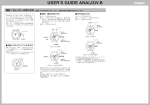
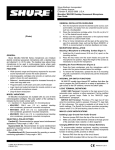
The crown can be pulled out to two click positions for
setting the date and time.
To set the date and time the first time (or to reset
the date and time after the battery is changed), do
the following:
1. Pull the crown out to the first click position (a).
2. Turn the crown until yesterday’s date appears.
3. Pull the crown out to the second click position (b).
4. Turn the hands forward until today’s date appears,
then continue forward until the current time is
reached. If the current time is in the afternoon or
evening, move the hour hand all the way around
the dial to pass 12 o’clock noon.
5. Push the crown back down.
To set the exact second, wait until the secondcounting hand reaches “60” before you pull out the
crown. Set the time then wait until the exact second
is reached before pushing the crown back down.
SECOND HAND
CROWN
a
DATE
b