1
Service Issues
Calibration
Water pump
$
Control panel access level must be set to "Service".
Calibration menus for pumps and valves are available through "xxx section -> xxx
devices -> xxx pump".
"
A graduated cylinder is required for pump calibration.
The example below is given for a developer water pump.
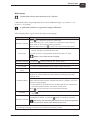
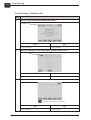
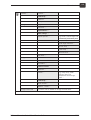
View/header
Action
Press
Processor overview
for 3 seconds to switch to sleep mode.
Some processors only: If the processor is configured for gum cleaning,
press "Stop" to skip the gum cleaning procedure.
Note the sleep mode icon
in upper left corner of the control panel.
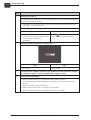
• Remove the hose from the replenishment/buffer container for the xxx1
section and keep it elevated to avoid spill.
Sleep mode
• Place the hose in the graduated cylinder filled with xxx1 liquid.
$
Processor overview
Xxx1
Xxx1 devices
Replenish/Buffer
pump
Make a note of the amount of liquid.
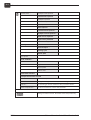
• Press the
button to enter the xxx1 section menu.
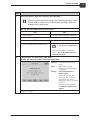
• Press the "xxx1 devices" button to enter the sub menu.
• Press the "Replenish/Buffer pump" button to enter sub menu.
• Press the "Calibrate" button to enter the pump calibration dialog.
The "Repl pump capacity : xxx ml/min" (or "Buffer pump ...") button gives
access to a numeric display and the possibility of entering new pump
capacity value.
Calibrate buttons
The "Start" buttonactivates the xxx1 replenish/buffer pump. Press "Stop"
when sufficient fluid has been pumped (after 60 sec.). Make a note of the
amount of liquid pumped.
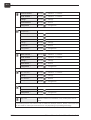
• Press "Adjust" to adjust the value if the displayed value is different from
the actual pumped volume, and add the correct value.
Press
Calibrate
. The new capacity will be calculated and stored.
• Press
in steps (or hold 1 sec. and release) to return to the Processor
Overview.
Select another section for calibration of pump, make other service
adjustments if needed, or press the
button to restart the processor.
Processor overview
" the processor return to the default access level.
Restarting will automatically switch service mode off and make
) Section name listed here as "xxx" refers to control panel text which will vary depending on
processing technology (chemical free or traditional developer solution).
1
Software Manual - Control Panel Service Guide
1114
4-3