1
6.9.1 Timer Icon…………………………………………………………………………23
6.9.2 Stopped Icon……………………………………………………………………..23
6.9.3 Running Icon……………………………………………………………………..23
6.9.4 USB Icon…………………………………………………………………………..23
6.9.5 Memory Corruption…………………………………………………………23
6.9.6 Backlight…………………………………………………………………………...23
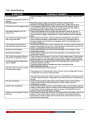
6.10 Fault Icons…………………………………………………………………………24
7. 7300 and 8600 Series Control Panel………………………………………..25
7.0 Description of Controls……………………………………………………….25
7.1 Autostart Control Module……………………………………………………...25
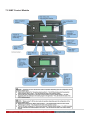
7.2 AMF Control Module……………………………………………………………26
7.3 Quickstart Guide………………………………………………………………..27
7.3.1 Starting the Engine…………………………………………………………...26
7.3.2 Stopping the Engine…………………………………………………………27
7.4
Viewing the Instrument Pages………………………………………………28
7.4.1 Status……………………………………………………………………………29
7.4.2 Engine…………………………………………………………………………..30
7.4.3 Generator……………………………………………………………………….31
7.5
Viewing the Event Log………………………………………………………..32
7.6
Controls…………………………………………………………………………33
7.6.1 ECU Override…………………………………………………………………..34
7.7 Automatic Mode…………………………………………………………………35
7.7.1 Waiting in Auto Mode………………………………………………………...35
7.7.2 Starting Sequence…………………………………………………………….35
7.8
Manual Mode……………………………………………………………………36
7.8.1 Waiting in Manual Mode…………………………………………………….36
7.8.2 Starting Sequence…………………………………………………………….36
7.8.3 Engine Running……………………………………………………………….37
7.8.4 Manual Fuel Pump Control………………………………………………….37
7.8.5 Manual Speed Control……………………………………………………….37
7.8.6 Stopping Sequence…………………………………………………………..38
7.9 Test Mode………………………………………………………………………...38
7.9.1 Waiting in Test Mode…………………………………………………………38
7.9.2 Starting Sequence…………………………………………………………….38
7.9.3 Engine Running……………………………………………………………….39
7.10 Protections……………………………………………………………………..39
7.11 Protections Disabled…………………………………………………………40
7.11.1 Indications/Warnings Alarms……………………………………………..40
7.11.2 Shutdown/Electrical Trip Alarms………………………………………...40
3|Page