1
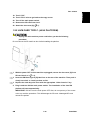
Rev. 03/2007 ⇒ Slot 2 is used for one of the optional applications: PostScript 3, Data Overwrite Security Unit, PictBridge, VM Card Slot 3 is used for installing the Browser Unit, VM Card, or for service only (for example, updating the firmware). 1.20.2 SD CARD APPLI MOVE Overview The service program “SD Card Appli Move” (SP5-873) lets you copy application programs from one SD card to another SD card. Slot 1 and Slot 2 are used to store application programs. But there are 3 possible applications (PostScript 3, DOS unit, PictBridge). You cannot run application programs from Slot 3. However you can move application programs from Slot 3 to either Slot 1 or Slot 2 with the following procedure (Slot 1 has the priority in this procedure if both Slot 1 and Slot 2 are used.): Make sure that the target SD card has enough space. 1. Enter SP5873 “SD Card Appli Move”. 2. Then move the application from the SD Card in Slot 3 to the card in slot 1. 3. Do steps 1-2 again if you want to move another application program. Exit the SP mode. Be very careful when you do the SD Card Appli Move procedure: The data necessary for authentication is transferred with the application program from an SD card to another SD card. Authentication fails if you try to use the SD card after you copy the application program from one card to another card. Do not use the SD card if it has been used before for other purposes. Normal operation is not guaranteed when such an SD card is used. Remove the cover [A] ( B230/B237 x 2), and then keep the SD card in the place [B] after you 1-64 SM