1
Summary Screen
About
the Wash
Options
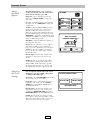
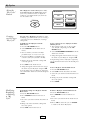
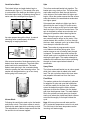
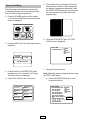
The Wash Options allow you to set options
for the current wash cycle only. After you have
made all desired changes, press OK.
Delay Start – Use to delay the start of your
washer. Press DELAY START to change the
delay time.
Presoak – Soaks the clothes before beginning
the wash cycle. Press PRESOAK to change the
soaking time.
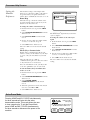
Additives – Appears ONLY AFTER a presoak
has been selected. Uses the contents of the
Wash Boost dispenser tray for a presoak.
When selected, the washer will drain after the
presoak and fill again for the wash cycle. Press
ADDITIVES to specify if you will NOT be using
a Wash Boost additive or if you do not want the
washer to drain after presoak.
OPTIONS
DELAY
START
PRE
SOAK
OK
1 HR
15 MIN
ADDITIVES
EXTRA
RINSE
SIGNAL
EXTENDED
SPIN
ARE YOU USING
PRESOAK ADDITIVES ?
Extra Rinse – Adds an additional cold rinse to
the end of the wash cycle.
Signal – Alerts you that the cycle is complete.
The clothes should be removed when the
beeper goes off so wrinkles won’t set in. Touch
SIGNAL to select the volume or to turn the
beeper off. The new volume will be saved as
the default setting.
YES
NO
Extended Spin – Increases the length of the
spin time to extract more water from your
clothes.
NOTE: The water level will vary depending
on the load size and type. The washer uses
adaptive filling and load sensing to provide
the appropriate water level for effective and
efficient wash performance and energy usage.
Adjusting
the Time
Settings
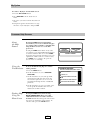
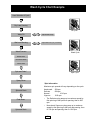
You can adjust the length of the wash cycle by
changing the cycle time, adding a Delay Start
or adding an Extending Spin.
Cycle Time – Press CYCLE TIME; then use the
arrows to select more or less time.
Delay Time – Use to add a Delay Start to the
beginning of the wash cycle. Press DELAY
START; then set the DELAY START time in
the OPTIONS menu.
Extended Spin – Increases the length of the
spin time to extract more water from your
clothes. Press EXTENDED SPIN; then select
EXTENDED SPIN from the OPTIONS menu.
NOTE: After the wash cycle begins, you will
not be able to change the Cycle Time or Delay
Time. The washer will beep twice if you try to
change the times after the cycle begins.
– 13 –
ADJUST TIME SETTINGS
CYCLE TIME
DELAY TIME
EXTENDED SPIN