1
Operation instructions
SLEEP mode
SLEEP mode can be set in COOLING ,HEATING or DRYING mode.
This function gives you a more comfortable environment for sleep.
The appliance will stop operation automatically after operating for 8 hours.
Fan speed is automatically set at low speed.
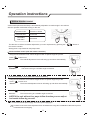
How to set SLEEP mode ?
Each time
Result :
SLEEP
button is pressed.
The operation mode is changed in sequence:
ON
SLEEP 1
SLEEP 2
SLEEP 3
SLEEP 4
QUIT SLEEP MODE
MODE
SMART
TEMP.
SLEEP mode 1:
Set temperature will rise by 2℃ at most if the appliance operates in cooling mode for 2 hours constantly,
then keeps steady.
SUPER
FAN SPEED
TEMP.
FEEL
SLEEP
Set temperature will decrease by 2℃ at most if the appliance operates in heating mode for 2 hours
constantly, then keeps steady.
CLOCK
TIMER ON
TIM ER OFF
QUIET
DIMMER
ECONOMY
SLEEP mode 2:
Set temperature will rise by 2℃ if the appliance operates in cooling mode for 2 hours constantly, decrease
by 1℃ after 6 hours, then decrease by 1℃ after 7 hours.
Set temperature will decrease by 2℃ if the appliance operates in heating mode for 2 hours constantly, rise
by 1℃ after 6 hours, then rise by 1℃ after 7 hours.
SLEEP mode 3:
Set temperature will rise by 1℃ if the appliance operates in cooling mode for 1 hour , rise by 2℃ after 2
hours, then decrease by 2℃ after 6 hours,
decrease by 1℃ after 7 hours.
Set temperature will decrease by 2℃ if the appliance operates in heating mode for 1 hour , decrease by
2℃ after 2 hours, then rise by 2℃ after 6 hours, rise by 2℃ after 7 hours.
SLEEP mode 4:
Set temperature will keeps steady.
Note: Press SUPER ,SMART, MODE,SLEEP or FAN button cancel SLEEP mode.
Note: By pressing "Sleeping mode" four times, or selecting other modes like SUPER, SMART, OR FAN,
you could cancel the sleeping function of those units without four sleeping curves.
Note: Heating is NOT available for cooling only air conditioner.
14