1
Tekk NT-10/80/90 Interface
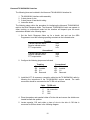
The following items are included in the Tekk NT-10/80/90 interface kit:
1. NT-10/80/90 interface cable assembly.
2. 2 short pieces of heat shrink tubing
3. Instruction sheet.
The following procedure interfaces the Tekk NT-10/80/90 with the Quick Response
Alarm.
1. Setup and program the Quick Response Alarm EEPROM
2. Configure the following jumpers as indicated.
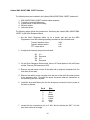
3. Configure the following jumpers as indicated:
JP1
JP2
JP3
JP4
1-2
Removed
1-2
Inserted
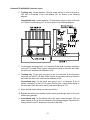
3. Adjust audio gains. Set line to TX gain (R25) to about 20%.
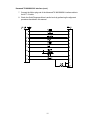
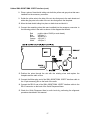
4. Remove the battery and solder the Quick Response power connector on the
NT-10/80/90 interface cable to the correct battery connectors on the Tekk
NT-10/80/90.
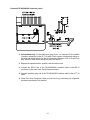
5. Connect the wall charger cable to the charging connector on the NT-10/80/90
interface cable. Cut the end connector off of the NT-10/80/90’s wall charger
cable. Separate and strip the two wires. Place a short piece of the heat
shrink tubing over each of the wires. Solder the wires from the wall charger
to the NT-10/80/90 interface cables charging leads. The wall charger’s
positive lead will be unmarked. The negative lead will have a white dashed
line running the length of it.
6. Replace the battery.
7. Connect power to the wall charger.
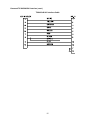
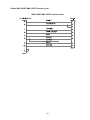
8. Connect the NT-10/80/90 interface to the Quick Response Alarm.
9. Connect the NT-10/80/90 interface cable to the options jack on the radio.
19