1
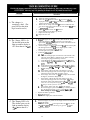
UNCRATING AND SET-UP
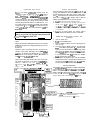
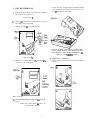
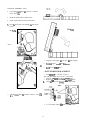
Remave your Series AC6000-6002 changer from the
shipping box. Open the door. (The T-handles are e screw-in
&pe and therefir, musk be fumed at leas! IO times counterclockwise unlil il opens.) Inspect for any ConneCtOTs Or
components that may have been dislodged during shipping.
The lock and keys for your changer will be inside the manila
envelope along with this manual. To install the lock, insert
the cylinder into the round hole in the middle of the T-handle
and push until it stops. Now turn the key and lock until you
hear it “snap.” Turn the key counter-clockwise % turn and
remove the keys.
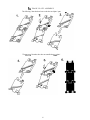
The only way to get a duplicate set of keys
made is to save the red tag that comes between the
,keys. This ID # starts with ACC
KOTE:
FILLING THE HOPPERS
When each hoppers has less than 80 . 100 coins left the red
“Empty” LED will light on the front of the changer. If you
have disconnected your LED make sure the orange wire is
going to the terminal on the LED that has the red positive
mark next to it. \hhcnever the “Empty” LED is “ON” the
validator is disabled and it will no longer accept bills.
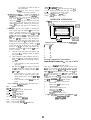
1. Turn OFF the power on the main logic board.
2. Pour the coins into the large opening in the funnel on
the top. There mat be nf leas1 enough coinr fo cover
t h e two g o l d ploter of the bottom of the hoppers.
(Somewhere between 160 and 17,000 coins minimum
to maximum.)
3. Turn “ON” the power switch. The “Empty” LED is
now off and the bill validator is ready to accept bills.
1.
TEST:
Before permanently installing the changer, do a functional
test to verify that there is no shipping damage to your new
changer(s).
2.
3.
4.
Extend the power cord through the hole in the back of the
changer or the bottom and plug it into a grounded IZOwc
outler. The dip switches are already set for a 4 coin per
dollar pay-out of the hoppers, and the Bill validator is
ready to accept $I-$5-$10.SZO dollar bills.
5.
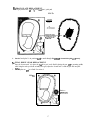
Fill tbe each hopper with at least 100 coins. On the main
logic board rum the switch on the bonom right comer “ON”.
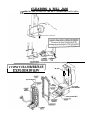
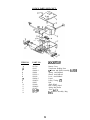
(SEE FIG. 1 ON PG.3) The rocker switch has a “I ” and
“0” printed on it. When the “I ” is pressed down the
changer is “ON”.
__.__._^_.___..._
-
BILL
METER
‘I
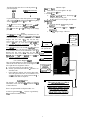
USING THE DUMP MODE TO EMPTY THE
HOPPERS
Open the cabinet door.
Turn OFF the POWER switch.
Place a suitable container in front of the hoppers to
catch the coins.
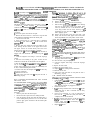
Press and hold the “DUMP” button on the upper right
comer of the Main Logic Board. Turn ON the Power
switch. The red LED numbers on the main logic board
will come on all “88888’s” then go all “00000’s”. Once
the red “00000’s” light up, release the “DUMP” button.
If it is not released within wo seconds, the “DUMP”
mode is canceled as a security feature.
The hoppers will dispense coins until the POWER
switch is turned OFF. If the red LED numbers are not
counting up rapidly on the Main Logic Board‘s display
the dump mode was not accessed. Please try again.
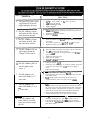
THE DIP SWITCHES
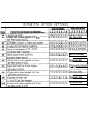
The AC6000-6002 series changer is capable of dispensing
coins in different pay opt modes. Sating the coins out per
dollar is controlled by which Dipswitches turned “ON.”
(Refer to figure I for their location.) For example. switch #2
is “ON” on both dipswitches; therefor the payout equals 4
coins per dollar. Two coins per hopper for one dollar.
._-.- ‘T THE DIPSWITCH BANK FOR SETTING
~THE BILL DENOMINATIONS.
(For those dip switches go to page IO.)
IFUSE
1
l&D INPUT I