1
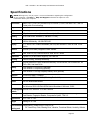
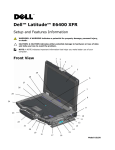
Dell™ Latitude™ XT2 XFR Setup and Features Information
1
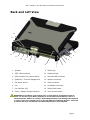
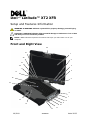
Display
12
Wireless radio on/off switch
2
Ambient light sensor
13
Touch pad
3
Device status lights
14
Touch pad/Track stick buttons
4
Digital array microphone
15
Track stick
5
Biometric reader
16
Keyboard
6
Microphone connector
17
Digital array microphone
7
Headphones connector
18
Power button
8
ExpressCard slot
19
Windows security button
9
Secure digital (SD) card slot
20
Screen rotate button
10
USB/e-SATA combo connector
21
Dell Control Point (DCP) button
11
Wi-Fi Catcher™ button
22
Hot Swappable Modules: Camera or
GPS (optional)
NOTE: Press <Fn><F9> to toggle between WLAN and WWAN. Latitude XT2 XFR does not
support simultaneous operation of WLAN and WWAN modes.
Page 2