1
Status Codes
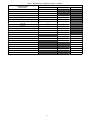
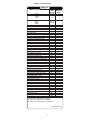
Table 6 shows the status codes flashed by the amber status light.
Most system problems can be diagnosed by reading the status code
as flashed by the amber status light on the control board.
The codes are flashed by a series of short and long flashes of the
status light. The short flashes indicate the first digit in the status
code, followed by long flashes indicating the second digit of the
error code.
The short flash is 0.25 seconds ON and the long flash is 1.0 second
ON. Time between flashes is 0.25 seconds. Time between short
flash and first long flash is 1.0 second. Time between code
repeating is 2.5 seconds with LED OFF.
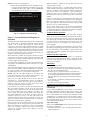
Codes are easily read from user interface (UI)
EXAMPLE:
3 short flashes followed by 2 long flashes indicates a 32 code.
Table 6 shows this to be low pressure switch open.
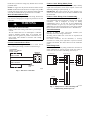
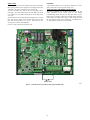
Utility Interface With Infinity Touch Control
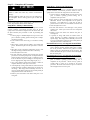
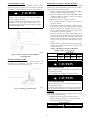
The utility curtailment relay should be wired between the two
UTIL connections on the control board for this Infinity
Communicating System (see Fig. 23). This input allows a power
utility device to interrupt compressor operation during peak load
periods. When the utility sends a signal to shut the system down,
the User Interface status screen will display, ”Curtailment Yes”.
See UI installation instructions for setup details.
Utility Relay
A13414
Fig. 23 -- Variable Speed Control Board with optional Utility Relay
18