1
7
Fault Correction
7.1
Types of Errors
21
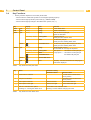
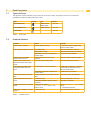
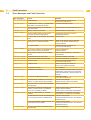
The diagnostic system indicates on the screen if an error has occurred. The printer is set into one of the three
possible error states according to the type of error.
State
Display
Correctable error
Key
Remark
pause flashes
Z item 3.5
cancel lights
Irrecoverable error
cancel flashes
Z item 3.5
Critical fault
-
Z item 3.5
Table 5
7.2
Error states
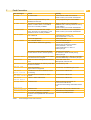
Problem Solution
Problem
Cause
Remedy
Transfer ribbon creases
Transfer ribbon too wide
Use a transfer ribbon slightly wider
than the width of label.
Print image has smears or voids
Printhead is dirty
Clean the printhead Z item 6.2.
Temperature too high
Decrease temperature via software.
Unsuitable combination of labels and
transfer ribbon
Use different type of ribbon.
Printer does not stop after
transfer ribbon runs out
Thermal printing is chosen in the
software
Change to thermal transfer printing.
Printer prints a sequence of
characters instead of the label
format
Printer is in ASCII dump mode
Cancel the ASCII dump mode.
Printer transports label media,
but transfer ribbon does not
move
Transfer ribbon incorrectly inserted.
Check and, if necessary, correct the
transfer ribbon web and the orientation of the label side.
Unsuitable combination of labels and
transfer ribbon
Use different type of ribbon.
Printer only prints each second
label
Setting of the size in the software is too
large.
Change the size in the software.
Vertical white lines in the print
image
Printhead is dirty
Clean the printhead Z item 6.2.
Printhead is defective (failure of heat
elements)
Change the printhead.
Horizontal white lines in the print
image
Printer is used with the
backfeed > smart in the cut or
peel-off mode
Set the backfeed > always in the
setup.
Z Configuration Manual.
Print image is irregular, one side
is lighter
Printhead is dirty
Clean the printhead Z item 6.2.
Table 6
Problem solution