1
MODEL 5600SE Upflow - V2.0
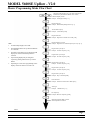
Master Programming Mode
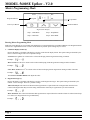
Program Indicator
Service
Flow
Program
P.M.
Set Up Button
Set Down Button
Extra Cycle Button
Regeneration Display
Step 1 - Brine/Rinse
Step 3 - Rapid Rinse
Step 2 - Backwash
Step 4 - Brine Refill
Entering Master Programming Mode
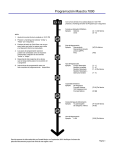
With Time of Day Display set to 1201 PM, push and hold for 5 seconds both the Set Up and Down Buttons. The Program Indicator
will turn on to signal that this mode is entered. In this mode all possible option settings may be viewed.
1.
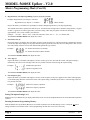
US/Metric Display Format (U)
Depress the Extra Cycle Button. This display is used to set the desired display format. This option setting is identified by the
letter U in the first digit. There are two possible settings:
US Format uses gallons for volume with a 12 hour timekeeping format. Regeneration timing in minutes.
Example -
[
]
Metric Format uses liters for volume with a 24 hour timekeeping format. Regeneration timing in tenths of minutes.
Example -
[
]
Cubic Meter Format uses m3 for volume with a 24 hour timekeeping format. Regeneration timing in tenths of minutes.
Example -
[
]
The Set UP and DOWN Buttons will adjust this value.
2.
Regeneration Type (7)
Depress the Extra Cycle Button. This display is used to set the Regeneration Type. This option setting is identified by the
number 7 in the first digit. There are 3 possible settings:
Timeclock Delayed. The control will determine that regeneration is required when the set Regeneration Time has been
reached. The Regeneration Day Override setting will determine which days a regeneration cycle will be initiated.
Example -
[
]
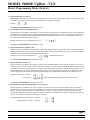
Meter Immediate. The control will determine that regeneration is required when the available volume of softened water drops
to or below zero. Regeneration to begin immediately.
Example -
[
]
Page 2
Printed in U.S.A.