1
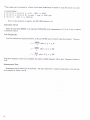
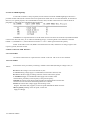
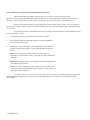
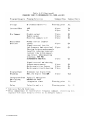
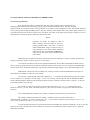
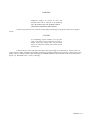
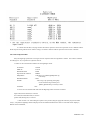
h. Continue down the table, verifying each line. Because the capacitance in the series equivalent circui1 is different from the
decade capacitor setting when the series resistance is large, use the RLC readout to indicate capacitance in those lines of the table.
5.8.7 Limit Comparison Bins
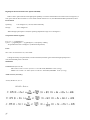
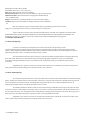
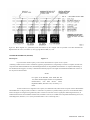
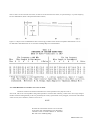
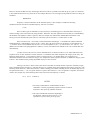
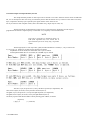
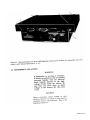
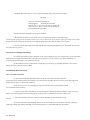
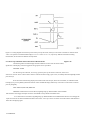
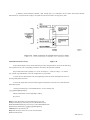
Verify the Digibridge performance with regard to limit comparison and bin assignments as follows. The resistance standard
1433-H (Figure 5-16) or equivalent is required for this test.
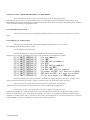
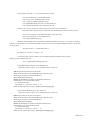
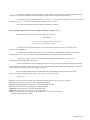
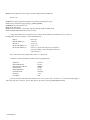
a. Confirm or select measurement conditions on the Digibridge as listed:
FUNCTION
DISPLAY
MEASURE RATE
EQUIVALENT CIRCUIT
FREQUENCY
MEASURE MODE
RANGE
EXT BIAS
-ENTER
-VALUE
-SLOW
-SERIES
-1 kHz (Press [1][=][SHIFT][FREQUENCY])
if necessary
-CONT
-Select range 3 by repeatedly pressing R/Q
for the first kohm range and then press
[SHIFT] [HOLD RNG], if necessary to hold.
-OFF
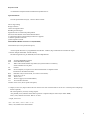
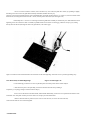
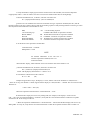
b. Connect the 1657-9600 extender cable from the Digibridge remote test fixture as follows:
"high" leads (red and red/white) to resistor H
"low" leads (black and black/white) to resistor L
"ground" lead (black/'green) to resistor G
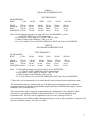
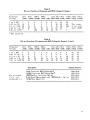
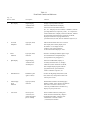
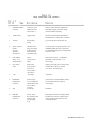
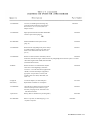
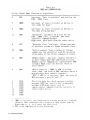
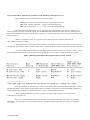
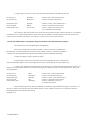
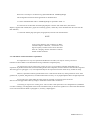
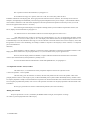
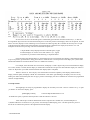
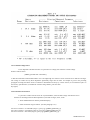
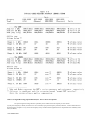
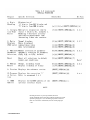
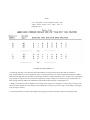
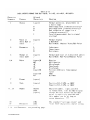
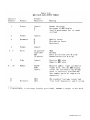
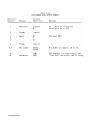
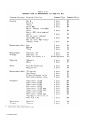
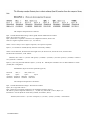
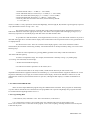
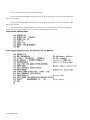
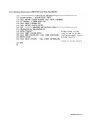
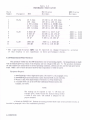
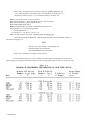
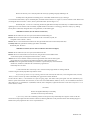
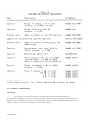
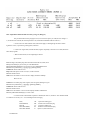
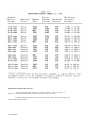
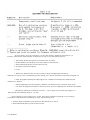
c. Refer to Table 5-12. After making the sequence of key-strokes (using the appropriate limit entry keys) shown under
"Entry", verify that the Digibridge numerical displays are like the numbers tabulated in the same row of the table under "Displays",
Make all entries as tabulated,
SERVICE 5-49