1
Appendix A
Appendix A:
Programming Watchdog
Timer
A watchdog timer is a piece of hardware that can be
used to automatically detect system anomalies and reset
the processor in case there are any problems. Generally
speaking, a watchdog timer is based on a counter that
counts down from an initial value to zero. The software
selects the counter’s initial value and periodically restarts
it. Should the counter reach zero before the software
restarts it, the software is presumed to be malfunctioning
and the processor’s reset signal is asserted. Thus, the
processor will be restarted as if a human operator had
cycled the power.
Programming Watchdog Timer
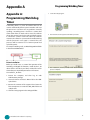
1. Click the Setup program.
2. The welcome screen appears. Click Next to proceed.
For sample watchdog code, see Watch dog and DIO folder
in the Driver and Manual CD
Driver Installation
Before you could access or control the operation of the
watchdog and Digital I/O functions, install the the L_IO
driver which is the library and driver needed for Lanner
General Purpose Input/Output interface or functions.
3. The installation process proceeds. Click Close when the
process completes.
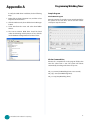
To install the L_IO driver:
1. Restart the computer, and then log on with
Administrator privilege.
2. Insert the Drivers and User’s Manual CD to the USBoptical drive.
3. Browse the contents of the support CD to locate the
file LannerIO v101.rar under the \WD_DIO\ folder and
unzip the file.
4. Click the Setup program in the unzipped folder.
Embedded and Industrial Computing
18