1
Chapter 4 – Unit Descriptions
Chapter 4
Unit Descriptions
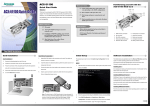
This chapter describes how to use the ACS-61020 RAID controllers.
Buttons
ACS-61020 4 bays and 2 x 4 bays
1.
2.
3.
Menu Button – Press to move forward
through the menus.
Enter Button – Press to make the
selection.
Both Buttons – Press both buttons
together to return to the previous menu
item.
LEDS
Each drive bay has the following LED’s:
Upper – Blue when the disk is being
accessed. Off when the disk isn’t being
accessed.
Lower – Green when the drive is
operating normally. Red when the disk
has failed.
ACS-61020 8 bays
1.
2.
ESC – Return to the previous menu item.
Enter – Press to make the selection.
3.
– Go up through the menu tree.
4.
– Go down through the menu tree.
The lights on the front display the following:
Power – Green when the power is on.
P/S Fail – Red when the primary power
supply has failed and the secondary
power supply is in use.
Access – Orange when the disks are
being accessed.
HD Lights –Green when the drive is
installed and Red when the drive has
failed.
21