1
AN004 BS3X QUICK START GUIDE : CONTROL ASSIGNMENT
Annexe : special controls
Special case 1 : infrared axis
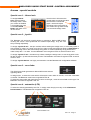
To assign Infrared
Axis, before entering
the assign menu, check
your control is enabled.
A 3 seconds long push
on the ON / HOLD
Button will switch on or
off the control.
Check on the LCD screen the
control state, as well as the value
sent and the « infrared bar
graph » which will adjust
according to the movements of
your hand. Now go back to step
1 to access the assign menu.
Special case 2 : joystick
The Bitstream 3X dual axis joystick allows to generate 2 distinct MIDI events
covering the X and Y axes (horizontal and vertical respectively). They are a bit
tricky to assign separately.
To assign Joystick X axis : the tips consists, before entering the assign menu, to move the joystick Y
axis full down (Y value = 0). Keep your hand on it (don’t move!) and press two times on Edit Button to
access the assign menu. Now move slowly the joystick on X axis maintaining the joystick down in
order to keep the Y = 0 value. If so the Bitstream must recognize CTRL 06, which means X axis.
To assign Joystick Y axis : the same way, before entering the assign menu, move the joystick X axis
full left (X value = 0) and redo the same process. The Bitstream must have recognized CTRL 07 which
means Y axis.
To assign Joystick Switch : we highly recommend to use the Bitstream 3X configuration software.
Special case 3 : cross-fader
The digital cross-fader generates 2 distinct MIDI events sent as
opposing values.
In assign menu, to select the event which will reach the max value on the left, move the cross-fader
on the left. The Bitstream must have recognized CTRL 48.
To select the event which will reach the max value on the right, move the cross-fader on the right. The
Bitstream must have recognized CTRL 49.
Special case 4 : automation (LFO)
To select the events generated by the LFO : in assign menu simply move any of the 3 Dedicated
Potentiometers. The Bitstream 3X recognizes CTRL 66.
www.waveidea.com
Rev 1.0 - Page 2