1
IntesisBox® ME-AC-MBS-1-2I1O v.1.13
User’s Manual
rev.9
2. Connection
The interface comes with a cable for direct connection to the AC indoor unit, a plug-in
terminal block of 2 poles for connection to a Modbus RTU RS-485 network, and a plug-in
terminal block of 5 poles for connection of external equipment in its general purpose digital
inputs and output.
2.1
Connection to the AC indoor unit
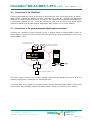
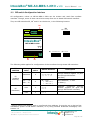
Disconnect mains power from the AC unit. Open the front cover of the indoor unit in order
to have access to the electronic circuit. In the electronic circuit locate the socket connector
marked as:
CN92 in Mr.Slim models, or CN105 in the rest of models.
Using the cable that comes with the interface, insert one of its connectors, the one installed
in the shortest uncovered part, into the socket of the ME-AC-MBS-1-2I1O, and the other
connector, the one installed in the largest uncovered part, to the socket CN92 or CN105 of
the AC unit's electronic circuit. You can place the ME-AC-MBS-1-2I1O inside or outside the
AC indoor unit depending on your needs, remember that ME-AC-MBS-1-2I1O must be also
connected to the Modbus RTU RS-485 network. Close the AC indoor unit's front cover again.
Electronic circuit of AC
indoor unit
ME-AC-MBS-1-2I1O
CN92 or
CN105
Connector
Connector
Cable
Do not modify the length of the cable supplied with the interface, it may affect to the
correct operation of the interface.
AC indoor unit
Electronic circuit board
CN105
or
CN92
For wall mount
extract the upper
and down staples
until you hear the
"click".
53 mm
40 mm
200 mm
CN105 for Domestic line, CN92 for Mr.Slim line. Consult list of models at the end of
the document to identify to which line belongs every model.
Connection cable
supplied with the
interface.
AC Unit
IntesisBox®
90 mm
ME-AC-MBS-1-2I1O
RS485
A
B
Modbus RTU
RS485
Bus
Doc: IntesisBox ME-AC-MBS-1-2I1O v1_13 User Manual eng r9.pdf
© Intesis Software S.L. - All rights reserved
IntesisBox is a registered trademark of Intesis Software SL
URL
email
tel
http://www.intesis.com
info@intesis.com
+34 938047134
Page 5 of 19