1
ALARMS
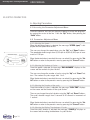
To return to the main menu, the user must press the “Valid” button.
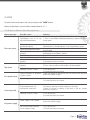
Actions to be done in case of alarm are described in § 7.3.
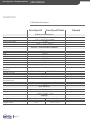
7.3 What to Do When an Alarm Message Occurs
Alarm message
Pressure alarm
Top alarm
Err speed sensor
Possible cause
Tubes recommended by Bertin
Technologies (see § 2.3) are
not positioned properly.
Action(s)
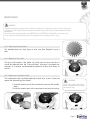
1.Reposition the grinding tubes on the holder.
2. Press in the middle of indented plate during depression phase
(cover open).
The indented plate is not
positioned properly.
The indented plate doesn’t
square to the type of the tubes.
The toric joint is not positioned
properly.
The indented plate is damaged.
The toric joint is damaged.
The vacuum is not working
properly
The cover is not locked
properly
Reposition the indented plate on the holder and make sure the
indented plate is placed properly using the positioning guide.
Change the indented plate and place the adapted indented plate
on the holder.
Reposition the toric joint on the holder and make sure it is adjusted properly to the holder’s groove.
Replace indented plate.
Replace toric joint.
1.Turn off the unit.
2.Contact technical assistance.
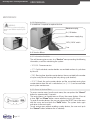
1.Check that nothing prevents the cover from closing.
2.Press cover and ensure the handle is locked properly.
Detection system is faulty.
1.Turn off the unit
2.Contact technical assistance.
Check the voltage on the back of the unit matches that delivered
by the main power supply.
Speed regulation or detection
system is faulty.
Power supply is not suitable.
Engine temperature has
reached the safety limit.
Over temp wait!
Detection system is faulty.
1.Turn off the unit.
2.Contact technical assistance.
1.Leave the unit on so that the motor ventilation can run.
2.Ensure air openings and the cooling fan are clear.
3.After 30 minutes of cooling, if the alarm is still on, contact
technical assistance.
1.Turn off the unit.
2.Contact technical assistance.
Power supply is not suitable.
Check the voltage on the back of the unit matches that delivered
by the main power supply.
No synchronization between
unit and power supply.
1.Turn off the unit.
2.Contact technical assistance.
Err power supply
Page 21