1
3M™ Digital Media System 800 Series
Basic Operations
ENGLISH
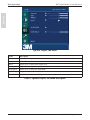
Picture “More” Display sub menu
Action
Description
Overscan
Adjusts the amount of cropping of the Image boundaries. (On/Off)
Change overscan from 90 to 100 percentile (in 1 degree increments)
Black Level
Black Pedestal level
1) 0 IRE Pal, NSTC-JP
2) 7.5 IRE NSTC
Phase
This function allows the user to the adjust the clock phase to reduce image distortion. (Only on
DVI-A and VGA)
Frequency
Adjusts the horizontal width of the image.
HQV
Turns HQV video processing On or Off
3D NR
Adjusts the amount of Temporal Noise reduction in the system
CODEC NR
Adjusts the amount of Mosquito and MPEG noise reduction in the system
BLOCK NR
Turns MPEG Block noise reduction On or Off
Reset
Resets values in this sub-menu only
Table 2: Advanced sub menu function description
© 3M 2007. All Rights Reserved.
21