1
7.7
I would like to adjust the brightness ............................................................. 23
7.8
I would like to turn on/off the lamp ............................................................... 23
7.9
I would like to freeze images ........................................................................24
7.10
I would like to rotate the image ....................................................................24
7.11
I want to capture images ..............................................................................24
7.12
I would like to record videos .........................................................................25
7.13
I would like to view captured/recorded images.............................................26
7.14
I would like to delete the captured/recorded images ....................................27
7.15
I would like to automatically delete the stored images whenever it is turned
off (Auto Erase) ............................................................................................ 27
7.16
I would like to enlarge a part of the image (PAN) .........................................27
7.17
I would like to use the MASK and Spotlight function ....................................28
7.18
I would like to play the slides (Slide Show) ..................................................29
7.19
I would like to compare images (compare live images with stored images
(PIP)) ...........................................................................................................30
7.20
I would like to reduce the image noise (Projector Type) ............................... 30
7.21
I would like to resume the factory default settings (Factory Reset) ..............31
7.22
I would like to change the splash screen ..................................................... 31
7.23 I would like to use a SD card........................................................................32
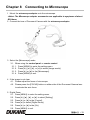
Chapter 8 Connecting to Microscope .......................................................................33
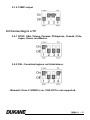
Chapter 9 DIP Switch Settings ..................................................................................34
9.1
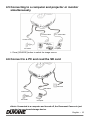
Connecting to a projector or monitor ............................................................ 34
9.2
Connecting to a TV ...................................................................................... 35
Chapter 10 Software instructions ................................................................................36
10.1
System Requirements ..................................................................................36
10.2 Installation & Function ..................................................................................36
Chapter 11 Troubleshooting ...................................................................................... 37
English - 2