1
Safety
To prevent deterioration, do not touch the terminals of the unit and
faceplate with your fingers.
WARNING
Stop the car before operating the unit.
How to reset your unit
Important to know...
To prevent a short circuit, never put or leave any metallic objects
(such as coins or metal tools) inside the unit.
Caution: Adjust the volume so that you can hear sounds
outside the car. Driving with the volume too high may cause an
accident.
Condensation: When the car is air-conditioned, moisture may
collect on the laser lens. This may cause disc read errors. In this case,
remove the disc and wait for the moisture to evaporate.
The illustrations in this manual are examples used to explain more
clearly how the controls are used. Therefore, what appears on the
illustrations may differ from what appears on the actual
equipment.
1
3
2
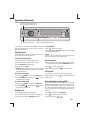
Reset
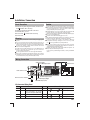
If this unit fails to operate properly, press the reset button.
The unit returns to factory settings when the reset button is pressed.
What’s in the box
If you experience problems during installation, consult your
Nakamichi dealer.
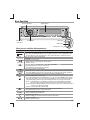
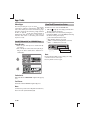
When you purchase external components, check with your Check and identify the contents of your package:
Nakamichi dealer to make sure that they work with your model and
in your area.
Maintenance
Cleaning the unit: Wipe off the dirt on the panel with a dry silicon or
soft cloth. Failure to observe this precaution may result in damage to
the monitor or unit.
Cleaning the connector: Wipe off dirt on the connector of the unit and
faceplate. Use a cotton swab or cloth.
Main unit
(with sleeve)
Front panel
Trim plate
Preparation
Carrying case
(for front panel)
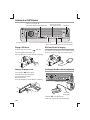
How to attach/detach the faceplate
Attach
Detach
1
2
1
User manual
2
Do not expose the faceplate to direct sunlight, excessive heat, or
humidity. Also avoid places with too much dust or the possibility of
water splashing.
Keep the faceplate in its casing while detached.
The faceplate is a precision piece of equipment and can be
damaged by shocks or jolts.
2 EN
ISO male
connector
Disassembly tool
(2pcs)