1
Contents
Contents
1
2
2.1
3
4
5
6
6.1
Introduction
Getting Started
Quick Start
Overview
Installing the VS-120 in a Rack
Connecting the VS-120
Controlling the VS-120
Controlling via the RS-232 Port
1
1
2
3
6
7
8
8
6.1.1
6.1.2
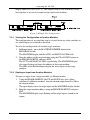
Connecting the RS-232 Port
Setting the Self Address
8
9
6.2
7
7.1
Controlling via the RS-485 Port
Operating the VS-120
Operating the VS-120 as a Switcher
9
10
10
7.1.1
7.1.2
7.1.3
Choosing Manual Mode
Routing an Input
Enabling and Disabling Inputs
10
10
11
7.2
Operating the VS-120 as a Scanner
12
7.2.1
7.2.2
7.2.3
Choosing Auto Mode
Scanning the Inputs
Detecting Errors
12
12
13
7.3
Operating Multiple VS-120 Units
13
7.3.1
7.3.2
Viewing the Configuration of Another Machine
Routing an Input from Another Machine
14
14
7.4
8
9
10
Operating Using Serial Commands
Technical Specifications
Hex Table
RS-232 Communication Protocol for the VS-120
15
15
16
16
Figures
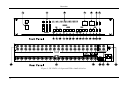
Figure 1: VS-120 20 x 1 Sequential Video Audio Switcher
Figure 2: Connecting the VS-120
Figure 3: Connecting a PC without using a Null-modem Adapter
Figure 4: PC Controlling Multiple VS-120 Units
Figure 5: Multiple Unit Configuration
4
7
8
10
14
i