1
Connecting to the SMTCP-2 for the first time
The first time you connect the SMTCP-2, you will need to perform the following steps to set
the initial configuration. This includes establishing an HTTP connection and manually setting
the IP address for the SMTCP-2.
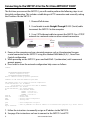
1. Power off all devices.
2. Use a female to male Straight-Through RS-232 (Serial) cable
to connect the SMTCP-2 to the computer.
3. Use a CAT5 ethernet cable to connect the SMTCP-2 to a TCP/
IP network via a network router or other network connection
that has DHCP enabled. If your network does not support DHCP,
please see page 8 of this manual for instructions.
RS-232
SERIAL
CAT5
CAT5
COMPUTER
IP ROUTER
SMTCP-2
MATRIX SWITCH (NOT CONNECTED)
4. Power on the computer and run a terminal program such as Hyperterminal to open a
serial connection to the SMTCP-2 using the standard 9600 baud, 8, N, 1 configuration.
5. Power on the SMTCP-2. When powered on, it will obtain an IP address automatically via
DHCP from the network.
6. The IP information for the SMTCP-2 will be displayed on the terminal screen as follows:
**************************
* SmartAVI control is UP *
*
version 10.12.20#6
*
**************************
addr:192.168.1.102
Mask:255.255.255.0
gtwy:192.168.1.1
**************************
NOTE: the above IP address is for demonstration purposes only. Actual results may be different.
7. The IP address shown must be used to connect to the SMTCP via HTTP.
www.smartavi.com
3