1
•
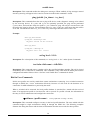
If a keyword is expected when the user types “ ?”, all valid keywords will be displayed, then the
command typed so far will be re-displayed, with the cursor sitting at the end (waiting for the user
to continue).
•
If the user had previously typed part of the keyword but did not finish it, and if the characters
typed so far uniquely identify the keyword, if the user types a tab (or a space) character, and the
system will complete the keyword automatically. If the characters typed so far do not uniquely
identify a keyword, nothing will happen.
If the user is not sure what to type next, he can type “ ?”, which will cause those keywords that match the
characters typed so far to be displayed.
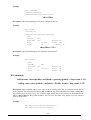
If an interactive mode is entered, the system will prompt for each parameter required, such as:
…
enter Link management protocol (none, none/Annex-D):
enter polling interval in seconds (10, 5 - 30):
…
The first prompt means there are two choices (none and Annex-D), with none being the default. The
second prompt means a number between 5 and 30 is expected, with 10 being the default.
If it is the first time a particular parameter is configured, typing a carriage return will cause the default
value to be selected. Otherwise, typing a carriage return means no change to the existing value.
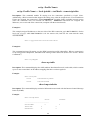
Some interactive commands will query the user for the type of parameter to be entered. For example,
…
enter Day-of-the-week (all, (a)ll/(d)ay-range): d
enter dd1-dd2 (Unspecified): mon-sat
…
“Express Mode” vs. “Advanced Mode”
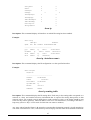
The Command Line Interface operates in one of two modes: Express Mode or Advanced Mode. In
Express Mode, not all parameters may be displayed. Default values are set for parameters not displayed in
multi-line commands. In Advanced Mode, users have the option to modify all possible values appropriate
to each operation.
The user can toggle between Express Mode and Advanced Mode by typing ^E (Control-E) at any time. Normally,
the system prompt will be changed by appending “>>” to the configured prompt when in Advanced Mode.
Conventions
Note that the meaning of “port n” may differ depending upon the model being managed. Examples using
the terminology are model-specific.
43