1
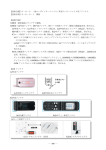
Displaying a Memo
The contents of a saved memo can be checked.
1
From the Menu, select [Tool] → [Memo] and press
Memo list Book air ticke
Milk,Sugar
090XXXXXXXX
12345
2
.
To copy the saved memo
Move the cursor to a memo and from the submenu, select [copy].
Select a memo and press
.
Memo The contents of the memo appear.
Book air tickets
for Okinawa by the end of Novem
ber.
To edit the memo
(edit). Enter a memo within 50 full-width or 100 half-width
Press
characters.
To delete the memo
From the submenu, select [delete] → [Yes].
▼
予測 000/100ハ゛イト 漢字 • Only a phone number within 24 digits that consists of half-width numbers, “ ”,
“#”, “-”, and “P” is allowed to be added to the Phonebook (however, if it starts
with “-” or “P” or contains “-” and “P” in succession, it cannot be added to the
Phonebook).
EV-Link is a function that enables easy cooperation between mail (E-mail) and audio call
(Voice). Using this function, you can send reply mail to a redial/received record as well as
place a reply call to mail with simple operation.
Memo/EV-Link
Using EV-Link
Other Useful Functions
To save a phone number in the memo to the Phonebook
From the submenu, select [add phonebook].
Sending Mail Using the Redial/Received Record
When the mail address and phone number of a recipient are saved in the Phonebook, mail
can be easily sent from a redial or received record.
1
Select a record and press
(option).
The submenu appears.
2
Select [edit mail] → a mail address and press
.
The Edit mail display appears.
The selected mail address is entered as the address.
3
Compose mail and send it.
• Follow the same steps as in the Compose and send mail (P.124, step 3 to 5).
161