1
MicroDock II
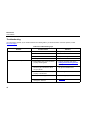
Troubleshooting
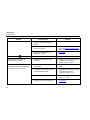
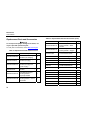
Problem
The oxygen sensor fails a bump test.
The detector fails a calibration.
The docking module does not
recognize the detector.
Possible Cause
Solution
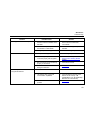
→ Detector’s oxygen alarm setpoints are
set to the same concentration as the
test bottle
→ Modify detector setpoints to be either
below or above the test bottle
concentration
→ Ambient air inlet (inlet 1) is blocked or
the inlet filter is contaminated
→ Remove the blockage or replace the
inlet filter
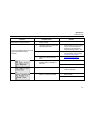
→ Zero gas cylinder is empty
→ Use a new zero gas cylinder
→ Gas cylinder is empty
→ Use a new gas cylinder
→ Barbed fittings may not have
connected properly with the gasket
→ Confirm connection (refer to the
Adding Another Docking Module
section)
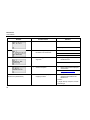
→ Gas connections are not hooked up
properly or are blocked
→ Check all connections
→ The detector and/or station are
damaged or defective
→ Contact BW
→ The detector is off
→ Turn on the detector
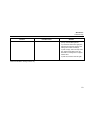
→ The detector does not have IR
communication capabilities
→ Check the label on the back of the
detector to see if it says – IR
(GasAlertMicro only. All GasAlertClip
Extremes can communicate)
→ The detector’s firmware needs to be
updated
→ Contact BW
49