1
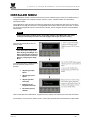
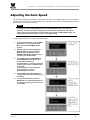
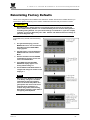
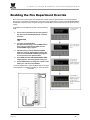
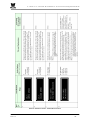
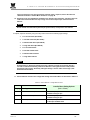
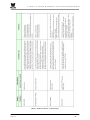
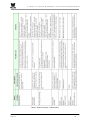
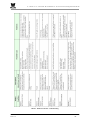
P: 1.866.300.1110 • F: 1.204.284.1868 • W: www.wallaceintl.com • A: 90 Lowson Crescent, Winnipeg, MB, Canada, R3P 2H8 INSTALLER MENU The Installer Menu consists of several functions which can be modified using the Smart DC Controller buttons or configured through the use of a laptop computer and the S.T.A.R.T. software available from the Wallace International website. The Installer Menu options provide more advanced configurations for the FoldSmart gate system. Access to the Installer Menu is through the User Menu. The navigational buttons are the same in both menu modes. To review how to use the navigational buttons on the Smart DC Controller, refer to Using the Smart DC Controller Buttons In Menu Mode. NOTE To access the User or Installer menus, the operator must be in Run Mode with a gate status showing on the display. The motor cannot be engaged and the gate cannot be moving. To access the Installer Menu, take the following steps: NOTE Four menu items, Usage Class, Gate Handing, Gate Weight, and Gate Length must be configured before the operator will function. Refer to Configuring the Setup Menu. In the pages that follow, a detailed view of the more commonly used menus is provided. Adjusting the Open Speed Adjusting the Close Speed Adjusting the IES Sensitivity Enabling the Fire Department Override Reinstating Factory Defaults Table 3-2 describes the Installer Menus, supplies the factory defaults, and references the hard-wire connections. For information on how the menu buttons function, review Using the Smart DC Controller Buttons In Menu Mode. Revision A.13 - 43 -