1
Congratulations on your purchase of the Radial SGI TX-RX studio guitar interface. The SGI has been designed and constructed to provide years of dependable performance whether it is used in the studio or on the road.
Your new SGI features a 100% discreet Class-A signal path to ensure optimum
audio performance and is equipped with transformer isolation to eliminate buzz
and hum caused by ground loops. To further assure sonic integrity, the SGI is
equipped with Radial’s unique Drag™ Control load correction circuit. Drag lets
you apply the perfect load to counteract cable capacitance and buffering to ensure the natural tone and dynamics of your instrument are maintained.
Although the SGI is ‘plug & play’ easy to use, we recommend that you take a few
minutes to read this short manual so that you get the most out of your Radial SGI.
Should you have any questions that are not covered in this manual, we invite
you to log onto www.radialeng.com and visit the FAQ section on our site. This is
where we post the latest updates and applications from users like you.
Now get out there and play guitar with your amp on the other side of the lake!
INTRODUCTION
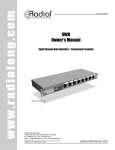
The Radial SGI studio guitar interface is delivered as a transmit TX and receive
RX set that is connected together with a standard balanced twisted pair XLR
microphone cable.
The SGI TX (or transmit module) is active buffered meaning that it requires power
to drive the signal. A high output 15VDC power supply is employed to power the
Class-A audio path and provides the horsepower to drive the signal. The SGI-RX
(or receive module) is passive. This means that it does not require any power.
The SGI is designed to transmit high impedance guitar signals to 100 meters
(330 feet) and beyond . With these distances in mind, it is likely that each end
will be connected to equipment that will in turn, be powered by different electrical
circuits. To alleviate noise problems caused by potential ground loops, the SGI
is equipped with isolation transformers at each end that have been matched and
counter-wired to offset any artifact.
The bright yellow finish increases visibility to make finding each end as easy as
possible, while construction is 14 gauge steel and features welded I-beam construction to eliminate potential stress on the PC board.
USING THE SGI
As always, before making any audio connection, ensure audio system power
is off and volume controls are turned down. This practice eliminates popping
caused by power-up transients that could damage loudspeakers or other
components.
FAQ
Begin by connecting your instrument to the SGI-TX, an XLR cable between
the TX and RX module, and the RX module to your guitar amp or pedals. You
can now connect the 15VDC power supply to the SGI-TX module. There is no
power switch. As soon as you connect the supply the LED should illuminate
telling you power is on.
Can I use other instruments such as a keyboard or even voice
through the SGI?
Yes. Just make sure you do not overload the input as this will cause
distortion. Keep in mind that the SGI is designed for guitar levels. Keyboards and line-level outputs are significantly more powerful and should
be attenuated.
Although the SGI has been optimized for guitar, you can use it with any highimpedance instrument. Just be careful with high output devices such as keyboards, as these could overload the input if driven too hard. If you intend to
use your SGI with high output instruments, simply listen to the signal to make
sure it is clean and distortion free. If you hear distortion, it is likely the keyboard
signal is too hot. Turn it down and you should be set to go.
The Radial SGI-RX is passive. The only control on the RX is a ground lift. This
lifts pin-1 ground on the XLR receive and is used to further eliminate ground
loops should hum or buss be encountered.
DRAG™ CONTROL
The Radial SGI-TX is equipped with a recessed knob called Drag control.
This unique load correction circuit allows you to apply a resistive-capacitive
load on your pickup to counteract any effect of the buffering circuit or cable.
It is designed specifically for passive guitar pickups that are most sensitive to
the input impedance of an amplifier. Drag will have almost no effect on active
devices such as keyboards.
For best results, we suggest that you start with a clean tone and set the Drag
control to 50% or 12 o’clock and then adjust to suit. More drag will result in a
darker tone, while less drag will reduce the load on the pickup and add sparkle. Simply find the setting that you like using a guitar pick as a screwdriver
and you are set. Drag control is subtle yet very musical.
Can I use the SGI as a re-amping device?
No. The Radial SGI employs a proprietary balanced signal between the
TX transmit module and the RX receive module, making in unsuitable for
typical line-level signals.
Why is the SGI bright yellow?
So you will be able to find the other end! Many studios are outfitted with
a labyrinth of connector panels and the SGI can easily be left in one place
or another. Bumble bee yellow should make tracking the SGI easy!
Does the Drag control have any effect on active pickups?
You will hear very little effect, if any, when using active instruments, as
their buffered outputs will generally not be affected by an added load. The
SGI’s Drag control is really designed to affect passive electric guitars.
Can I connect effect pedals between the SGI and my guitar amp?
Yes of course! The SGI will work just like your guitar, except you will be
able to play your amp several hundred feet away.
Can I use the SGI on a large stage to drive my amp?
Yes. Although we have other products in our Tonebone range such as
the Switchbone and Loopbone that can do this very well for distances
up to 50 feet.
Could the SGI cause noise or cross talk in a live touring snake
system?
The SGI is completely analogue and is low level. You should not encounter any of these problems using the SGI.
You are now set to go!
SGI with Off-Stage Amps
SGI in the Studio
SGI with Off-stage Wireless Systems
100 ft.
SGI TX
SGI RX
75 ft.
300’ XLR Mic Cable or Snake
Radial Engineering
SGI User Guide
Radial Engineering
SGI User Guide
Radial Engineering
SGI User Guide