1
Yocto Reference Manual
6.6.6 How to configure the Kernel or Bootloader
Luckily the bootloader used by Phytec, the barebox, uses the same build system as the
Linux kernel. Therefore all commands in this section can be used to configure the kernel
and bootloader.
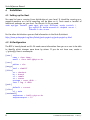
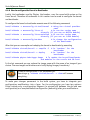
To configure the kernel or bootloader execute one of the following commands
host$ bitbake ‐c menuconfig virtual/kernel # Using the virtual provider name host$ bitbake ‐c menuconfig linux‐ti # Or use the recipe name directly (If you use an AM335x Module) host$ bitbake ‐c menuconfig linux‐mainline # Or use the recipe name directly (If you use an i.MX6 Module) host$ bitbake ‐c menuconfig barebox # Or change the configuration of the bootloader After that you can recompile and redeploy the kernel or bootloader by executing
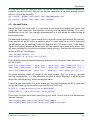
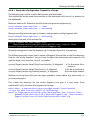
host$ bitbake virtual/kernel ‐c compile ‐f # Or 'barebox' for the bootloader host$ bitbake virtual/kernel ‐c deploy # Or 'barebox' for the bootloader host$ bitbake phytec‐hwbringup‐image # To update the kernel/bootloader and modules in the rootfs and SD‐Card. In the last command you can replace the image name with the name of an image of your
choice. The new images and binaries are in build/deploy/images/<machine>/.
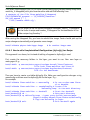
The build configuration is not permanent yet.
Executing e.g. bitbake virtual/kernel ‐c clean will remove
everything. To make your changes permanent in the build system, you have to integrate your
configuration modifications into a layer. For the configuration you have two options:
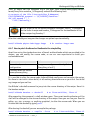
Either include only a configuration fragment (a minimal diff between the old and new
configuration) or a complete default configuration (defconfig) after your modifications.
22
© PHYTEC Messtechnik GmbH 2015
L-813e_2