1
Android TV User Manual
2.0 WLAN Hotspot
2.1 lP settings
l.Operations on Devices
Home Screen*
K
t ,or"...*
Androld TV User Manual
1
Portable hotspot
r
Android TV User Manu!
3.Key ln lP addross and othsr parameter
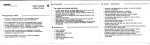
.Click the checkbox to activate 'Show advancsd optlonB"
Select "Portable Wi-Fi
hotspot"
2.Select "Set up Wi-Fi hotspot" to set up "Network
"Password" parameters
SSlD", "Security",
2.2 Ethernet Function
2.Choose "Static" for "lP settings"
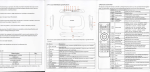
t.Cttcl Iicon on the home screen, ctick Ethernet switch to ON to start
Ethornet. lnsert RJ45 interface into android TV. lf local area network is DHCe
androld TV will connect to the network
2.automatically. When there is
.ru
icon showed on the right bottom, android T\
haB bo6n connected to the local area network.