1
Pairing
Now that the Longbow™ wireless transmitter is connected to you amplifier (ideally using the High Level
cable), unpack Habitat1 subwoofer and place on a clean sheet or towel to protect finish.
Each Habitat1 comes pre-paired with its REL Longbow™ transmitter box. If the units need to be re-paired, or
you would like to add more Habitat1 subs to the system, there are a few easy steps to follow.
REL Habitat1 wireless sub bass systems come paired to a single transmitter out of the box. In the event that
the sub and transmitter becomes un-paired, the owner must follow the procedure below to repair.
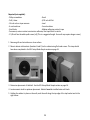
1 Make sure that the transmitter AC to DC wall plug supply is connected to an AC outlet, and that
the barrel connector is connected to the transmitter. A white LED on the front of the transmitter
will indicate the unit is on by blinking in the standby pattern which is one flash per second.
2 Make sure that the sub is plugged into an AC outlet using the supplied AC cable and that the sub
is turned on. Power switch is located on the rear panel.
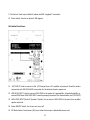
3 Exercise the momentary “Pair” switch on the transmitter located on its control face. This will
make the transmitter look for a new sub. Note that the LED flash pattern will change to two
blinks per second.
4 Next exercise the momentary “Pair” switch on the sub located on the control panel.
5 At this point the sub and transmitter should find each other and pair together. This will be indicated
by the blue LEDs on both the transmitter and control panel staying lit (no flashing).
The REL Habitat1 wireless sub bass system can pair up to four subwoofers using one transmitter. To pair more
than one sub to a single transmitter, follow the instructions above and repeat for each subwoofer added.
When using two transmitters with two independent systems in proximity to each other
(within the same house):
1 Follow the pairing instructions above for the first system.
2 Turn off the first transmitter by unplugging it.
3 Follow the pairing instructions above for the second system.
4 Turn the transmitter on for the first system back on.
15