1
SETTING
CHOOSE CARD
Here you can choose the card(s) on which you want to store the videos and
photos. If set to AUTO, the recording will be alternated between card A and
card B once it is full.
options: AUTO
CARD A ONLY
CARD B ONLY
FORMAT CARD
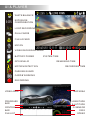
Here you can format the currently selected card. Please check the card icon
shown on screen carefully before formatting. All files will be lost once you start
the formatting process.
(If you are using microSD cards bigger than 32GB, please format the cards on a computer to
be FAT32 format. )
options:
NO
YES
RESTORE DEFAULTS
Here you can restore all the settings to the factory default settings.
options: NO
YES
FIRMWARE VERSION
Here you can find the current version of the firmware in your camera. You may
need this information when you are trying to upgrade the camera to a later
firmware. The firmware is sorted by releasing date; the suffix number means
the sequence on that date.
option:
FW 20141224 V1.0