1
Optic 2
Issue 1
_______________________________________________
and "7.00 bar / 101.0 PSI / 700kPa", with the default setting at "0.02 bar / 0.2 PSI / 2
kPa".
To change the Initial Run Pressure option:
1.
Use the Up or Down arrow key to move to the required pressure. Single
presses
of an arrow key change the current setting in steps of "0.01 bar / 0.1
PSI / 1kPa". Continuous pressure on an arrow key changes the current setting in
steps of
"0.10 bar / 1.0 PSI / 10kPa".
6.6.14 Final Run Pressure
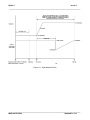
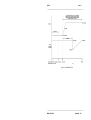
The Final Run Pressure option defines the carrier gas pressure at the end of the
method run. The range is between "0.00 bar / 0.0 PSI / 0kPa" and "7.00 bar / 101.0
PSI / 700kPa", with the default setting at "0.02 bar / 0.2 PSI / 2 kPa".
To change the Final Run Pressure option:
1.
Use the Up or Down arrow key to move to the required pressure. Single
presses
of an arrow key change the current setting in steps of "0.01 bar / 0.1
PSI / 1kPa". Continuous pressure on an arrow key changes the current setting in
steps of
"0.10 bar / 1.0 PSI / 10kPa".
6.6.15 Solvent Monitor Threshold
The Solvent Monitor Threshold is the value used to automatically determine the solvent
elimination time. This parameter sets the threshold for a sensor that monitors the
presence of solvent in the split line. The sensor reading, (displayed during this phase
of the run), must rise above the threshold during injection. The run starts when the
reading falls back below the threshold.
The range is between "0" and "700", with the default setting at "0".
To change the Solvent Monitor Threshold option:
1.
Use the Up or Down arrow key to move to the required setting. Steps are in
increments of "1".
Note: When using this facility with manual injections, (Large Volume with "Vent Time"
set to "Auto"), press the Run key, then inject the sample. The run will
automatically
start when the solvent has been eliminated.
6.6.16 Exit the Large Volume Method Menu
To exit the Large Volume Method Menu and return to the Method Menu.
1.
Press the Menu Exit key
_______________________________________________
Page 6.14
Method Menu