1
On-screen menus
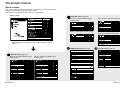
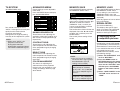
Menu screens
The various settings and adjustments for this projector can be carried out by
selecting the operations from on-screen menus.
The general arrangement of these menus is shown below.
Menu screen
When a HDMI signal is being input
When a YPBPR signal is being input
When a PC signal is being input
B Press the MENU button to display the menu screen.
Refer to page 42 for details on how to operate the on-screen
menus.
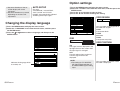
LANGUAGE menu (page 50)
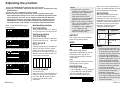
PICTURE menu (page 44)
When an S-VIDEO/VIDEO signal
is being input
40-ENGLISH
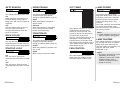
OPTION menu (page 51)
When a YPBPR/PC/HDMI signal
is being input
ENGLISH-41
Adjustments and settings
POSITION menu (page 48)
When an S-VIDEO/VIDEO signal
is being input