1
BEFORE USING
CONTENTS
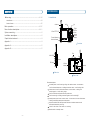
Before using … … … … … … … … … … … … … … … … … … … … … … … … …01-02
1. Indoor Monitor
Indoor Monitor… … … … … … … … … … … … … … … … … … … … … … … …04
Outdoor Camera
… … … … … … … … … … … … … … … … … … … … … … …05
Antenna
Left
Basic operations … … … … … … … … … … … … … … … … … … … … … … …05-07
Up
Right
Function
Down
Answer
Unlock
Monitor
Menu functions descriptions… … … … … … … … … … … … … … … … … …08-11
System connecting … … … … … … … … … … … … … … … … … … … … … …12
Installation descriptions… … … … … … … … … … … … … … … … … … … … 12
Simple failure treatment… … … … … … … … … … … … … … … … … … … … 14
3.5inch TFT LCE
Power indicator
Unlock indicator
Appendix I … … … … … … … … … … … … … … … … … … … … … … … … … …14
MI C
MIC
Speaker
Front view
Appendix II… … … … … … … … … … … … … … … … … … … … … … … … … …15
Appendix III… … … … … … … … … … … … … … … … … … … … … … … … … …15
Slot
Mini USB
Speaker
ON/OFF
SD card
Lithium
battery
Bracket
Side view
Rear view
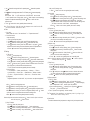
Buttons descriptions:
:In standby status, it use for entering calling other monitors status; at menu status,
it use for choose the last menu; at talking and monitor status, it use for taking video.
:At menu status, it use for choose the next menu, or cancel alarm; at talking and
monitoring status, it use for taking image
:Use for out off the menu (back to last menu) at the menu.
:Use for move to right. In talking or monitoring status ,use for switching IR.
:In standby status, press it enter to menu status. In menu status, it is as a confirm button.
In talking or monitoring status press to take photos.
: Answer the call when the visitors press the call button in outdoor camera or as the
confirmation button when you do ring.
: Unlock for the visitors in talk status, or monitoring.
: Monitor outside in standby status.
- 3 -
- 4 -