1
Installation
Topaz B&W Effects
User Manual
Topaz B&W Effects is a Photoshop plug-in, which
means it won’t run by itself and requires a compatible
host program for use.
To Install
1. Close Photoshop or other image editing program if
you are using it.
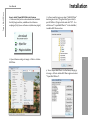
2. Double-click on the Topaz B&W Effects folder to
access the installer, and then follow the on-screen
instructions.
Mac Dmg Windows exe
3. Your Topaz B&W Effects plug-in will automatically be
installed in your Photoshop plug-ins folder.
4. After the installation, you will need to enter your
license or trial key.
Entering Your Key
Entering your trial key allows you to save your projects
and print them during your evaluation period. Entering
your license key allows you do the same, except without any time limitations.
1. Start by opening up an image in Photoshop.
2. Go to Filters -> Topaz Labs -> BW Effects 2 -> Menu
-> Enter key.
3. You can then copy and paste or type your key in.
Important: To install the product on a second computer, you will need to download Topaz B&W Effects and
then enter your same license key.
Host-Specific Installation
Topaz B&W Effects is also compatible with Lightroom,
Aperture and iPhoto. To use B&W Effects in any of
these programs you will need to download and install
the free Topaz Fusion Express compatibility add on.
You can get it online at: www.topazlabs.com/downloads
Important for Mac Users:
After installation, Topaz B&W Effects will be installed in
the following folder: “ Macintosh HD -> Library -> Application Support -> Topaz Labs -> BW Effects 2”.
In Windows, Topaz B&W Effects is supported by most
host applications that support Photoshop plug-ins.
This includes Paint Shop Pro, Photo Impact and Irfanview, although there are additional host programs that
may also support Topaz B&W Effects.
If your Photoshop is installed in a customized location,
you will need to manually create a shortcut (alias) link
inside folder “<Photoshop install folder> -> Plug-ins”
that links to “ Macintosh HD -> Library -> Application
Support -> Topaz Labs -> BW Effects 2 -> Plug-ins”.
To install B&W Effects in either Paint Shop Pro, Photo
Impact, or Irfanview first download Topaz B&W Effects
to the default location. Then, to configure it into each
program, follow the host-specific instructions on the
next page.
3