1
ADI Engineering: The Open IP ODM
EEPROM from EFI shell or another drive will require a separate installation of the latest Intel Network
Connection Tools from the Intel Business Portal (IBP) (Document #348742).
1. Copy the Rangeley EEPROM update file to a USB flash drive. File should be in text format.
2. Insert USB flash drive into RCC-DFF system.
3. Power on RCC-DFF system
4. Boot to Fedora Linux as user root on the eMMC flash as described in section 2.2.
5. Go to the folder with the eeupdate64ei update utility and EEPROM text file.
cd ../rcc/lantools/OEM_Mfg
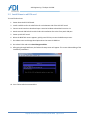
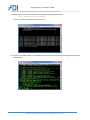
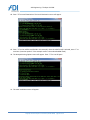
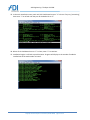
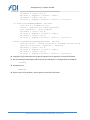
6. Identify Rangeley GBE ports using the EEUPDATE utility.
./eeupdate64e
4 ports will be identified as NICs 1-4. Rangeley ports are identified by Vendor-Device 8086-1F41.
Using: Intel (R) PRO Network Connections SDK v2.23.8
EEUPDATE v5.23.13.00
Copyright (C) 1995 - 2014 Intel Corporation
Intel (R) Confidential and not for general distribution.
Warning: No Adapter Selected
NIC Bus Dev Fun Vendor-Device Branding string
=== === === === =============
=================================================
1
0 20 00
8086-1F41
Intel(R) Ethernet Connection
2
0 20 01
8086-1F41
Intel(R) Ethernet Connection
3
0 20 02
8086-1F41
Intel(R) Ethernet Connection
4
0 20 03
8086-1F41
Intel(R) Ethernet Connection
I354
I354
I354
I354
[root@localhost OEM_Mfg]#
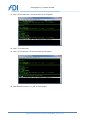
7. To update the Rangeley EEPROM, NIC #1 should be selected in the update command. Below is an
example of the update command. Filename.txt is the EEPROM programming file.
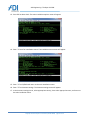
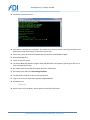
./eeupdate64e /nic=1 /d filename.txt
8. Wait for command to complete and verify it reports successful. DO NOT CYCLE POWER DURING
UPDATE.
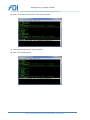
9. Shutdown Linux.
poweroff
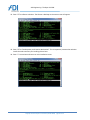
10. When Linux is fully powered down, power cycle the RCC-DFF board. Note that the new EEPROM
programming changes will not be read in by the Rangeley CPU until power is cycled.
Rangeley RCC-DFF Platform User Manual (45700-0006) page 20 of 36