1
QUICK START USERS GUIDE
If you do not understand any part of this quick start users
manual and would like the complete version, Please visit
our web site @ www.encoreautomotivesystems.com
The complete manual is necessary for advanced users and not all user
functions are covered in this quick start guide.
Encore
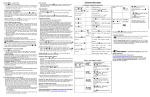
CHIRP INDICATORS:
Chirp
Function
1 chirp
Lock
2 chirps
Unlock
Encore E-7s Remote Transmitter
PARKING LIGHT:
Parking light
1 flash
2 flashes
ON
LED if installed
LED
Off
Slow
Flash
On
(Solid)
E-2
Function
Lock
Unlock
Running on remote start
THIS PRODUCT IS DESIGNED FOR PROFESSIONAL
INSTALLATION ONLY
ACTIVE LOCK:
1. Press button on the transmitter.
2. The horn, if installed will chirp once and parking lights will flash once
indicating that the system is now active. The vehicle doors will lock upon
activating when interfaced with the keyless entry system.
Optional E2s Two button remote
Function
Unlock
Locked
Valet Mode
ACTIVE UNLOCK:
1. Press button on the transmitter.
2. The horn will chirp twice and parking light will flash twice to indicating that
the keyless system is now unlocked. The vehicle doors will unlock.
DEACTIVATING WITHOUT A TRANSMITTER
The Override function may be used if the remote transmitter is lost or
inoperative.
OPTIONAL: E2s Ultra Miniature Remote
This optional remote can be used in applications where the factory
Keyless entry system is the main source for locking and
unlocking the vehicle. For example, vehicles with the
factory smart key/ “push button” start or one-piece remote with key, an E2s Ultra Miniature remote may be
purchased for remote start and unlock only applications. This ultra-small remote may be preferred if your factory
remote is integrated within your key.
REMOTE TRANSMITTER OPERATION:
E7s
Transmitter
Button
System Function
Remark
Lock Doors
Panic
Unlock Doors
Two Steps Door Unlock &
Disarm System
-
Trunk Release (Channel 3)
Press & hold for 3 sec.
Press twice within 3
seconds.
Press and Hold for 2
seconds
-
Activate The Remote Start
Push twice to start
-
Stop remote start operation **
Push Twice to stop engine
+
Switching code For 2nd Car
Operation.
WARNINGS:
As with any product that performs automatic functions, there are certain safety precautions
that you must practice and be aware of.
• Keep the transmitter out of children’s reach.
• Do not leave anyone in the vehicle while running on remote control.
• Alert servicing personnel that the vehicle can be started automatically.
•
Do not start the vehicle by remote while it’s in an enclosed area or garage.
•
•
•
•
•
Always apply the parking brake and lock the vehicle as you exit the vehicle.
The vehicle windows must be rolled up.
Should the unit malfunction, disconnect the fuse until the problem is corrected.
The use and operations of this system is the sole responsibility of the operator.
Some areas may have local ordinances that prohibit leaving a vehicle running on public
streets.
THIS DEVISE CANNOT BE USED ON ANY STANDARD TRANSMISSION VEHICLE.
FOR AUTOMATIC TRANSMISSIONS ONLY!
•
PROGRAMMING TRANSMITTERS:
The units default is safety start. This requires the user to push the start
button twice to remote start the vehicle and prevent accidental starts. The
unit can be programmed to start on one push of the start button.
Programming required.
BATTERY CHANGING:
Depending on the usage, the remote batteries should be changed at least
once a year.
The 1-way remote, (E-7s) is powered by a pair of 3V, CR2016 batteries.
These batteries are available at most locations batteries are sold and can
be replaced by the user.
Note: This mode will only retain the last 4 remote transmitters programmed. If the transmitter
memory is exceeded, the security system will start deleting transmitters from memory in
chronological order.
1. Turn the Ignition 'switch ‘OFF/ON’ 4 TIMES and stay in ON position.
“Within 15 seconds”.
2. Push the Valet switch 4 times and hold it on the 4th push until a long chirp is heard then release
the valet switch. You are now in the Transmitter programming mode.
3. Press and hold any button of the transmitter until the siren responds with a confirming chirp,
indicating the signal has been stored into memory.
4. If you have additional transmitters (up to 4) that need to be programmed, repeat step 3 for each
transmitter.
Exit: Turn Ignition to 'OFF' position, or leave it for 15 seconds. 3 long chirps & 3 parking light flashes
will confirm exit.
Please register your product @ www.encoreautomotivesystems.com
For Customer service, Please call (855) Go-Encore
855-463-6267, 8:00-5:00 PST
1. Enter the vehicle and turn the ignition switch to ‘ON’ position.
2. Within 10 seconds push and release the valet switch
VALET MODE:
The valet switch allows you to temporarily by-pass all system function,
eliminating the need to hand your transmitter to parking attendants or garage
mechanics. When the system is in valet mode, and remote start functions are
bypassed, Enter Valet Mode:
1. Under Unlock condition, turn the ignition to “ON” position.
2. Press and hold valet switch for 2 seconds until the LED turns on. The LED
will remain on as long as the system is in ‘valet mode’.
Exit Valet Mode:
1. Return to normal operation, turn ignition ‘on’.
2. Press and hold valet switch for 2 seconds, The LED will turn off
Indicating that the system has exited the valet mode.
IGNITION CONTROL DOOR LOCKS.
If the vehicle’s door locks have been interfaced to the security system, the
system will automatically lock the vehicle’s doors when the ignition is turned
“ON” and /or unlock the vehicle’s doors when the ignition is turned “OFF”.
TRUNK RELEASE (Additional Installation Required)
Press and hold the
button on transmitter for 3 seconds to activate the trunk
release or other electric devices.
PANIC FUNCTION:
The transmitter can be used as a remote panic switch to manually trigger the system
in case of emergency.
1. Press and hold the button for 3 second. The unit will immediately sound.
2. During panic mode, the normal function of this transmitter button will be disabled.
and buttons can be used to lock and unlock the door (if the
The transmitter
option is installed).
3. To stop the alarm, press and hold the transmitter button on the transmitter again for
3 seconds.
.
4. If the button is not pressed, the system will stop after 30 seconds.