1
Welcome
Welcome to the world of Motorola digital wireless communications! We are pleased that you
have chosen the Motorola W375 wireless phone.
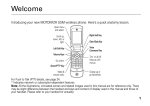
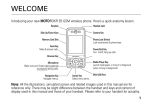
Menu Key
Open a menu when it
appears in the display.
Left Soft Key
Perform functions identified
by left display prompt.
Web Browser Key
Volume Controls
Send/Answer Key
Make & answer calls. Press
in idle screen to see recently
dialled calls.
Mini-USB Connector
Charge the battery or
connect to a PC.
Earpiece
Listen to your voice calls
& messages.
Right Soft Key
Perform functions identified by
right display prompt.
Message Key
Access the Message menu.
Power/End Key
Press & hold to turn the phone
on/off. Press & release to end
phone calls, exit menu system.
Navigation Key
Scroll up, down, left or right.
Headset Jack
Note: All the illustrations, simulated screen and related images used in this manual are for reference only. There
may be slight difference between the handset and keys and content of display used in this manual and those of
your handset. Please refer to your handset for actuality.
1