1
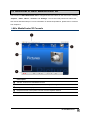
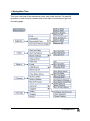
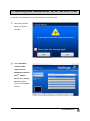
201108 Table of Contents Chapter 1 Introduction ......................................................................... 5 1.1Device Introduction ...........................................................................................6 1.2System Requirements .......................................................................................7 1.3Activating AVer MediaCenter 3D .......................................................................7 1.4Overview of AVer MediaCenter 3D ....................................................................8 AVer MediaCenter 3D Console ................................................................................................. 8 Control Buttons On Title Bar .................................................................................................... 9 Control Buttons On Playback Window Control Panel .............................................................. 9 Navigation Tree....................................................................................................................... 10 1.5Running AVer MediaCenter 3D for the First Time .......................................... 11 Chapter 2 Getting Started .................................................................. 13 2.1Capture .............................................................................................................14 Capture in Live ....................................................................................................................... 15 Operations of TimeShift .......................................................................................................... 16 Operations of Recorded Files .................................................................................................. 17 Using Schedule Recording ...................................................................................................... 18 2.2Capture in 3D ...................................................................................................20 Recording a 3D Content .......................................................................................................... 20 Playing a Recorded 3D Content .............................................................................................. 21 2.3 .Video ...............................................................................................................23 Playing Video Files ................................................................................................................. 23 2.4 Music ...............................................................................................................24 Adding Music to your Playlist ................................................................................................ 24 Playing Music ......................................................................................................................... 25 2.5Pictures ............................................................................................................26 Viewing the Captured Images ................................................................................................. 26 Playing Slide Show ................................................................................................................. 26 Chapter 3 Advanced Operations ........................................................ 27 3.1General Settings ..............................................................................................28 Configure Recording ............................................................................................................... 28 Configure Snapshot ................................................................................................................. 29 More Options .......................................................................................................................... 30 3.2Capture Settings ..............................................................................................31 Configure HD Input Source .................................................................................................... 31