1
25
Guideline
3.
4.
5.
6.
7.
You might want to set the swEventTrapLevel to something in the middle
say a “3”, which will capture all the critical, error and warning messages. If
you set it to 4 or 5 you will be inundated with messages, which may be
appropriate if you are troubleshooting an issue in the SAN.
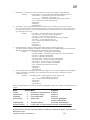
authTraps does some authentication checking if a request comes in from a community that is not
known to the agent.
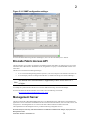
The next section of the SNMP agent configuration is where the Trap Recipient IP addresses and
community strings are entered. The user should configure the IP addresses and community strings that
are on their SNMP management station.
The final section is an SNMP Access Control List (ACL). This provides a way for the administrator to
restrict SNMP get/set operations to certain hosts/IP addresses. This would be used for enhanced
management security in the Storage Area Network.
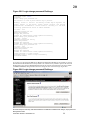
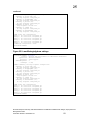
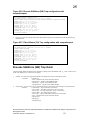
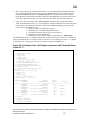
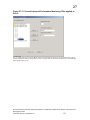
Figure 25-2 shows an example of setting the swEventTrapLevel to 5 so that all Trap events are sent to
the SNMP manager and configuring the authTraps parameter so that authentication-warning messages
get sent to the SNMP manager. It also shows the user how to set the IP Address of the Trap recipient.
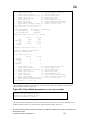
Figure 25-3 shows the resultant configuration settings from command performed in step 2.
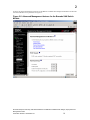
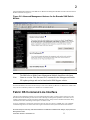
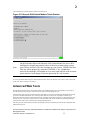
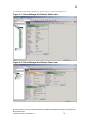
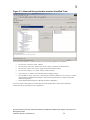
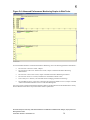
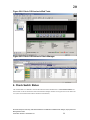
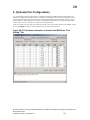
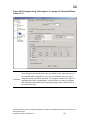
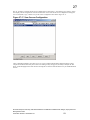
These configurations can also be performed from Web Tools Interface through the Admin interface. See
Figure 25-4.
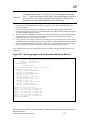
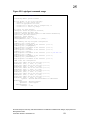
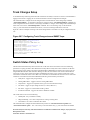
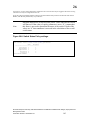
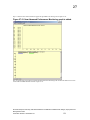
Figure 25-1. default agtcfgshow for the Brocade SAN Switch Module
brocadessm1:USERID> agtcfgshow
sysDescr = Brocade SAN Switch Module for IBM eServer BladeCenter
sysLocation = End User Premise.
sysContact = Field Support.
swEventTrapLevel = 0
authTraps = 0 (OFF)
SNMPv1 community and trap recipient configuration:
Community 1: Secret C0de (rw)
No trap recipient configured yet
Community 2: OrigEquipMfr (rw)
No trap recipient configured yet
Community 3: private (rw)
No trap recipient configured yet
Community 4: public (ro)
No trap recipient configured yet
Community 5: common (ro)
No trap recipient configured yet
Community 6: FibreChannel (ro)
No trap recipient configured yet
SNMP access list configuration:
Entry 0: No access host configured
Entry 1: No access host configured
Entry 2: No access host configured
Entry 3: No access host configured
Entry 4: No access host configured
Entry 5: No access host configured
brocadessm1:USERID>
yet
yet
yet
yet
yet
yet
Brocade Enterprise and Entry SAN Switch Modules for IBM eServer BladeCenter Design, Deployment and
Management Guide
Publication Number: 53-0000561-01
127