1
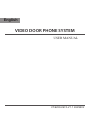
1. Parts and Functions
1
2
3
4
5
6
7
9
8
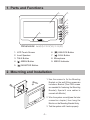
Dimensions: 160(H)×223(W)×25(D)
1. LCD Touch Screen
6. ( ) UNLOCK Button
2. Loud Speaker
7. ( ) CALL Button
3. TALK Button
8. Microphone
4. ( ) MENU Button
9. MESG Indicator
5. ( ) MONITOR Button
2. Mounting and Installation
1. Use the screws to fix the Mounting
Bracket on the wall.(fitting accesories
includes a Bracket (Two 4X25 screws
are needed for fastening the Mounting
Bracket), Special 4 core cables to
connect with Monitor)
2. Wire the system correctly(see the later
connection chapter) then hang the
Monitor on the Mounting Bracket firmly.
3. Test the system untill it works properly.
-1-