1
Main Functions
• Start Pump 1
• Start Pump2
• Start Pump3
• Start Light
• Starting Blower
• Starting Superjet Blower
• Economy Mode
• Standby Mode
• Display Time
• Progress Bars
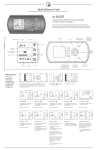
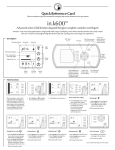
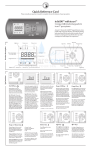
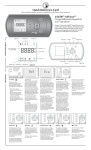
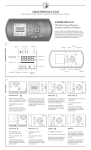
This menu allows control of all pumps, blower and spa light, as well as the activation
of the Economy and Standby modes. Every time a device is on, its animated icon is
displayed. All pump activity can be stopped at once by activating the Standby mode.
• Press Mode key
to display the
mode Selection window.
• Select Spa to view Spa menu.
Starting Light
• Select Light key to turn light on.
• Select Light key again to turn
light off.
(120 minute built-in timer)
1
Starting Pump 1
Starting Pump 2
*
Starting Pump 3
*
• Select Pump 1 to turn Pump 1 on.
• Select Pump 1 repeatdely to control
pump 1 speeds.
• Select Pump 2 to turn Pump 2 on.
• Select Pump 2 once more to turn pump
2 off.
• Select Pump 3 to turn Pump 3 on.
• Select Pump 3 once more to turn pump
3 off.
(20 minute built-in timer)
(20 minute built-in timer)
(20 minute built-in timer)
Standby Mode
Displaying time
Viewing active progress bars
Stops all pumps at the same time by a
simple click of a button!
• Press Ok key to display the time.
• Press Ok key a second time to go back
to water temperature display.
A progress bar is a visual indicator of the
time remaining before a device is turn off
or before the end of the Standby mode.
Only one bar is displayed at the time.
Next menu page
• Press Next key to display the next page
in the spa menu.
Goes to blower option
2
Starting Superjet Blower 2
*
• Select Blower to turn Blower on.
• Select Blower once more to turn
blower off.
(20 minute built-in timer)
• Select Standby to activate
this mode.
• Select Standby to again to resume
normal operations.
System automatically returns to Normal
mode after a certain period of time,
unless the Standby mode has been
reactivated.
* optional item
Spa light will flash for a few seconds
before the exit of Standby mode and
restart the pumps. The "Standby"
message is also displayed during Standby
mode.
* Pump will stay turned on if there is a
request for more heat.
• Use Left or Right keys to visualize the
progress bar of each activa-
ted device.
Starting Blower 1
*
• Select Blower to turn Blower on.
• Select Blower once more to turn
blower off.
(20 minute built-in timer)