1
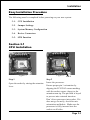
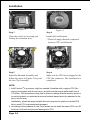
Installation Figure 3 Figure 4 Step 3 Step 4 Close the socket by lowering and locking the actuation lever. Install the Fan Heatsink. * Please do apply thermal compound between CPU and Heatsink. Figure 6 Figure 5 Step 5 Step 6 Install the Shround Assembly and follow the arrow of Figure 5 for press the two Clip Assembly. Make sure the CPU fan is plugged to the CPU fan connector. The installation is completed. NOTE: 1. Intel PentiumTM 4 processor might be crashed if installed with a regular CPU Fan since it is equipped with all new micro- architecture that brings quite small size of CPU(Die). We recommend using Intels reference design thermal solution which is an active heatsink; an extruded aluminum heatsink based and a fan attached to the top on the fin array. Additionally, please do apply heatsink thermal compound or paste and install CPU fan to avoid CPU overheated and damaged. 2. According to the guidance of Intel Corp, please do not install the same CPU over 50 times as it will bend the pins and damage the CPU. Page 3-4