1
user manual
1 Basic Operation of Kingsoft Presentation
1.1 Introduction of Kingsoft Presentation
Kingsoft Presentation is a software program used to create presentations in the form of slides, These slides
allow the user to organize and present information with text, picture, audio, or video files in a professional
and presentable manner. As a software upgrade, Kingsoft Presentation 2012 not only inherits the
advantages of the preceding version, but also provides a new and improved 2012 interface style. This new
interface brings additional features aimed towards enhancing the user's experience. However, the classic
interface style still remains for those users that prefer it. Now let's cover the Kingsoft Presentation
functional interface and describe the main functions and basic operations of the software.
1.1.1 Kingsoft Presentation Environment
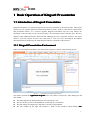
When you start Kingsoft Presentation, the main interface appears as shown in the following picture:
Figure 1.1—1 Kingsoft Presentation Main Interface
The window contains the Application Program menu, tabs, ribbon, root directory, slide editing area and
task window.
� The ribbon displays the different functions of each respective tab.
� The root directory previews the thumbnails of each slide in a presentation.
� The slide editing area displays the slide that is currently being modified.
� The task window on the right side contains 11 kinds of task windows which include: New
2