1
CONTENTS
CONTENTS
2
REFERENCED DOCUMENTS ....................................................................................................... 2
CHAPTER 1
INTRODUCTION ................................................................................................. 3
1.1
DESCRIPTION .................................................................................................................... 4
CHAPTER 2
INSTALLATION & USAGE .................................................................................. 5
2.1
INSTALLING THE PLUG-IN ................................................................................................... 6
2.2
OPENING THE RTOS VIEWER TABLES .............................................................................. 11
2.3
INTERPRETING TASK TABLE DATA .................................................................................... 13
2.4
INTERPRETING QUEUE TABLE DATA ................................................................................. 15
FIGURES
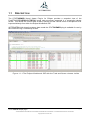
Figure 1-1-1 The Eclipse Workbench IDE with the Task and Queue viewers visible ....................... 4
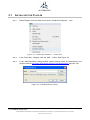
Figure 2-1: 'Install New Software...' menu item................................................................................ 6
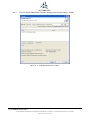
Figure 2-2: 'Add Repository' Dialog. ................................................................................................ 6
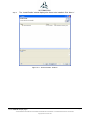
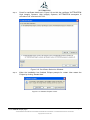
Figure 2-3: „Available Software‟ window. ......................................................................................... 7
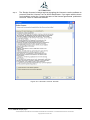
Figure 2-4: 'Install Details' window. ................................................................................................. 8
Figure 2-5: 'Review Licenses' window. ............................................................................................ 9
Figure 2-6: Certificate Selection Window ...................................................................................... 10
Figure 2-7: Restart Eclipse notice. ................................................................................................ 10
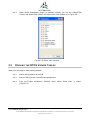
Figure 2-8 Show View window ...................................................................................................... 11
Figure 2-9: Opening up the "Other" view dialogue......................................................................... 12
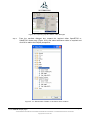
Figure 2-10: StateViewer Tables in the Show View window. ......................................................... 12
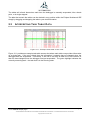
Figure 2-11: Example task table screen shot ................................................................................ 13
Figure 2-12: Right clicking on the Task Table to reveal the "Toggle Stack Checking" pop up menu
.............................................................................................................................................. 14
Figure 2-13: Example queue table screen shot ............................................................................. 15
REFERENCED DOCUMENTS
Ref #
Document
None
Installing and using the
STATEVIEWER Eclipse plug-in
Description
Version 2.0
THE INFORMATION CONTAINED IN THIS DOCUMENT IS PROPRIETARY AND SUBJECT TO THE RESTRICTIONS ON THE COVER PAGE.
Copyright date as document date.
Page 2