1
Strong Encryption
PKWARE has added the ability to use strong encryption when compressing files.
This new feature adds a higher level of security for your data. If your version of
PKZIP is licensed to use this feature, you will be able to choose from several strong
encryption algorithms to encrypt your files. Strong encryption is available as part of
the optional security module. If your copy of PKZIP is not licensed to use this
feature, contact PKWARE at 1-414-354-8699, or visit www.pkware.com, for
information on how to activate strong encryption.
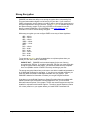
With strong encryption you can configure PKZIP to use any of these algorithms.
AES – 256 bit
AES – 192 bit
AES – 128 bit
3DES – 168 bit
3DES – 112 bit
DES
RC2 – 128 bit
RC2 – 64 bit
RC2 – 40 bit
RC4 – 128 bit
RC4 – 64 bit
RC4 – 40 bit
To use strong encryption, specify cryptalgorithm or recipient options when you
create your .ZIP files. Refer to online help.
IMPORTAN T: PKWARE has introduced support for the use of strong
encryption with .ZIP files. If you plan to share the .ZIP files you create using this
strong encryption feature with others, you should first make sure the recipients
have a compatible version of PKZIP 6.0 so they can decrypt your files.
The strong encryption feature lets you choose to use either a traditional password or
an X.509 digital certificate for encryption. If you plan to use a digital certificate, you
must first obtain and install a valid digital certificate onto your system. Visit
PKWARE’s website for information on where you can get a Digital Certificate.
If you plan to use the Digital Signature or Strong Encryption features available with
PKZIP Command Line on systems running Windows NT 4.0, you must install
Microsoft Internet Explorer 4.0 or greater. PKZIP uses several system security files
installed in conjunction with Internet Explorer. Therefore, Internet Explorer (version
4.0 or later) must be on your system before you install PKZIP Command Line.
Page 14
PKZIP Getting Started Manual