1
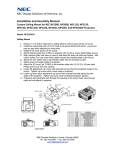
Figure 2 Important Note: To enter the On-Screen Menu (OSM) without a properly working remote control, you must utilize the Menu button on the projector and scroll through the tabs and selections with the Up/Down/Right/Left arrow buttons, and Enter/ Exit buttons. Not all of the models have the same Menu structure, therefore, some of the Tabs and Settings described in the following sections may be slightly different between models. 5. Using the Menu button on the projector, confirm that the Control ID setting is set to “Off.” The Control ID setting can be found in the projector’s OSM under Setup Installation(2) Control ID. See Figures 3 and 4. Figure 3