1
688 Attack Sub
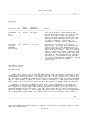
Chapters 1-2: Introduction to 688 -- The first two chapters are designed to
get you into the game quickly and painlessly. By no means do you have to
read both chapters -- if you're the type of player who doesn't like to read
manuals, follow the step-by-step instructions in Chapter 1 and you'll be
ready to choose a mission and begin play. However, the fastest way to get
your finger on the launch button is to let the Quick Start Guide in Chapter 2
lead you through the first mission, TORPEX '89. By showing you how to set
up an attack on several decommissioned warships, the Quick Start Guide will
introduce you to the sub's controls and basic game concepts.
Chapters 3-7: Captain's Reference -- Refer to these chapters only when
you need to know about something specific -- missions, controls, tactics,
or ship and weapon specifications.
Getting Started
===============
To play 688 Attack Sub, you need a computer with at lease one floppy drive
and 384k of free memory. Your system must be running on DOS 2.0 or
higher.
688 Attack Sub has an unusually large number of detailed screens, bitmaps
and text; in fact, over two megabytes of information, all of which had to be
compressed several times to fit onto the floppies included in the package.
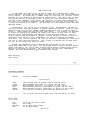
The result is YOU CAN'T PLAY FROM THE ORIGINAL 688 DISK(S). Instead
2
-------------------------------------------------------------------------------
an install program on your original 688 disk creates a copy of the game from
which you'll play. The install program configures the game to your current
system. If you upgrade your system, you should create a new copy of the
game. The time it takes to make a copy of the game varies depending on your
hardware. Although the process can take up to several minutes, we felt the
extra time was a fair trade for the game's stunning graphics and fine detail.
5.25" users: You'll find two disks in the package: Disk #1 and Disk #2.
During installation, you'll have to swap these disks.
3.5" users: The entire game has been packed onto one disk. Whenever you're
asked to insert an original Disk (#1 or #2), insert the single disk included
in the package.
Installing 688 Attack Sub on a Hard Disk
========================================
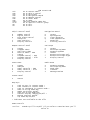
To copy all the files from the original 688 disks to your hard disk, do the
following:
1.
2.
3.
4.
5.
6.
Turn on your computer and wait for the DOS prompt.
Insert the original Disk #1 in drive A or B.
Type A: or B: (whichever drive the original disk is in) and press <ENTER>.
Type INSTALL and press <Enter>. On slow machines, you may not see
anything on your screen for about a minute.
You'll be asked what kind of disks you want to install the game on. Type
1 and press <Enter> to install the game on your hard disk.
Next, you'll be asked where the original Disk #1 is. Type A or B
(whichever drive the original Disk #1 is in) and press <Enter>.
Seite 3