1
100
Web Info
For more information
about Windows, visit
the Computer
Concepts CourseMate
Web site at www.
cengagebrain.com,
navigate to the
Chapter 3 Web Info
resource for this
book, and then click
Windows.
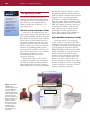
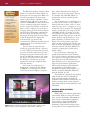
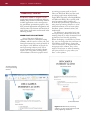
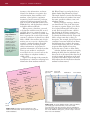
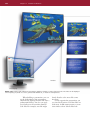
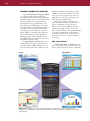
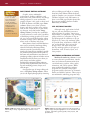
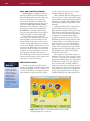
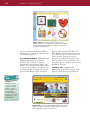
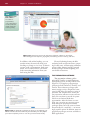
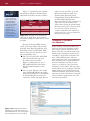
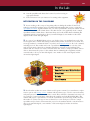
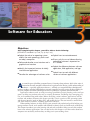
Figure 3-1 System
software is the
interface between the
user, the application
software, and the
computer’s hardware.
In this example, a user
instructs the word
processing software to
print a document, the
word processing
software sends the
print instructions to
the system software,
and the system
software sends the
print instructions to
the printer.
Chapter 3 Software for Educators
The Operating System
As with most computer users, you are
probably somewhat familiar with application software. To use any application software, however, your computer must be
running another type of software — an
operating system.
THE ROLE OF THE OPERATING SYSTEM
Software can be categorized into two
types: system software and application software. System software consists of programs
that control the operations of the computer
and its devices. System software serves as
the interface between you (the user), your
application software, and your computer’s
hardware (Figure 3-1). One type of system
software, the operating system, contains
instructions that coordinate all of the activities of the hardware devices in a computer.
The operating system also contains
instructions that allow you to run
application software.
Before either a Mac or a PC can run
any application software, the operating system must be loaded from the hard disk or
other storage location into the computer’s
memory. Each time you start your computer,
the operating system is loaded, or copied,
into memory. After the operating system is
loaded, it tells the computer how to perform
functions, such as processing program
instructions or transferring data between
input and output devices and memory. The
operating system, which remains in memory
while the computer is running, allows you
to communicate with the computer and
other software, such as word processors,
gradebooks, and other application programs. The operating system continues to
run until the computer is turned off.
USING DIFFERENT OPERATING SYSTEMS
Each new release of an operating
system contains new features that make
computers more powerful and easy to use.
In addition, the newest operating systems
provide enhanced integration with the
World Wide Web and increase the multimedia capabilities of computers. Due to
budget constraints and other factors,
however, schools, businesses, and home
users do not always upgrade their computers every time a new version of an
operating system is released. As a result, a
number of different versions of operating
systems currently are running on school,
business, and home computers.
System Software
Sy
Application Software